
Session expired
This webhook can post a request to your API when a session (transaction) status turns expired. An expired session is not deleted yet, but it is no longer accessible and cannot be recovered by extending the session.
Why do I need this?
Section titled “Why do I need this?”This webhook is similar to Session deleted, however it occurs before deletion — usually within minutes for a standalone transaction (one that is not part of a workflow), or within days when the transaction is part of a workflow.
It lets your system react to an abandoned transaction while its data still exists — for example to follow up with the recipient, re-send the form, or record the drop-off.
Session expired request and response
Section titled “Session expired request and response”Following are the definitions for the body request posted from CelloSign to your API.
| Element | What it’s for? |
|---|---|
| Event | Object that includes the event type WHEF_SESSION_EXPIRED and a timestamp. |
| Session | Object with details on the session the webhook was fired from. It includes the following elements: id — session token reference — aggregator ID for the business process process_id / process_number — the business process identifiers transaction_number — ID for the transaction, locatable in the CelloSign UI application recipient — in a workflow, indicates the recipient id in the process and its convention name labels — a key/value object reflecting values injected into labels (see API documentation for details) |
| recipient | The id of the recipient and convention name |
| labels | Any key/value that is associated with the session |
Example post request
Section titled “Example post request”{ "event": { "type": "WHEF_SESSION_EXPIRED", "timestamp": "2025-01-26T09:20:03.439650" }, "session": { "id": "xM72By4JkM", "reference": "2d12cdb3-d666-4dbd-8827-d7c165ed9d17", "process_id": "2d12cdb3-d666-4dbd-8827-d7c165ed9d17", "process_number": 28, "transaction_number": 17, "recipient": { "id": 1, "name": "client" }, "labels": { "CUSTOMER_TAG": "CUSTOMER_VALUE" } }}Expected response
Section titled “Expected response”A successful response from the API should include array of objects, were each object includes “id” and “value” key/value pairs as in this example. Values will be injected into their corresponding id in a session.
{ "status": "0", "errordesc": ""}Optionally include form data and attachments
Section titled “Optionally include form data and attachments”These options are configured per webhook, in the webhook’s Body section, and they appear only for the Session expired webhook. All three are off by default, so existing expiry webhooks keep sending exactly the same payload as before — no changes and no action required unless you opt in.
| Switch | What it does |
|---|---|
| Include data | Adds a data array containing the form field values the recipient entered before the session expired. |
| Include paragraph fields | When Include data is on, keeps read-only paragraph-type fields in the data array. When off (the default), paragraph fields are stripped out. |
| Include attachments | Adds an attachments array containing uploaded files / images. The signed document is not included. |
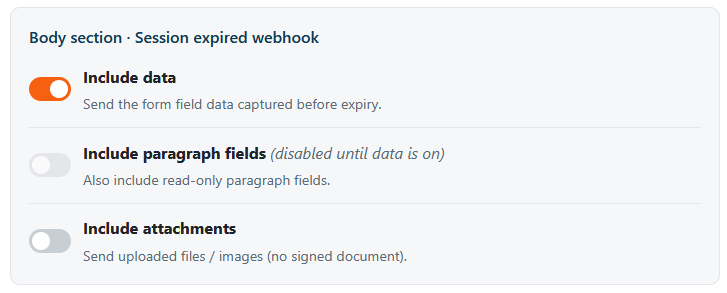
Dependency. Include paragraph fields only has an effect when Include data is on. While Include data is off, the paragraph switch is disabled. Turning Include data on enables the paragraph switch, but it stays off until you turn it on explicitly.
Added body elements
Section titled “Added body elements”When enabled, the following elements are added to the request body (same shape as the Archive webhook):
| Element | What it’s for? |
|---|---|
| data | List of form elements. Each element includes: id — element id value type — element type |
| attachments | List of attachments collected during the process. Each element includes: id — form element id filename mimetype content — Base64 string of the file |
Which keys are added per option
Section titled “Which keys are added per option”| Option state | Added top-level keys |
|---|---|
| All off (default) | none — baseline payload above |
| Include data (paragraph off) | data — paragraph entries stripped |
| Include data + Include paragraph fields | data — paragraph entries kept |
| Include attachments | attachments (uploaded files / images; never the signed document) |
Example post request — data and attachments included
{ "event": { "type": "WHEF_SESSION_EXPIRED", "timestamp": "2025-01-26T09:20:03.439650" }, "session": { "id": "xM72By4JkM", "reference": "2d12cdb3-d666-4dbd-8827-d7c165ed9d17", "process_id": "2d12cdb3-d666-4dbd-8827-d7c165ed9d17", "process_number": 28, "transaction_number": 17, "recipient": { "id": 1, "name": "client" }, "labels": { "CUSTOMER_TAG": "CUSTOMER_VALUE" } }, "data": [ { "id": "FIELD_FULLNAME", "value": "Jane Doe", "type": "text", "meta": {} } ], "attachments": [ { "id": "FIELD_IDCARD", "filename": "id-card.png", "mimetype": "image/png", "content": "iVBORw0KGgoAAAANSUhEUgAA...==" } ]}Note on sensitive data. Enabling Include data or Include attachments transmits potentially sensitive information — including data the recipient never formally submitted (PII, uploaded documents) — to your configured webhook endpoint. This is the same exposure profile as the Archive webhook and is fully opt-in. Make sure your endpoint uses HTTPS and authentication.