
Notes for Release 4.51
תוכן זה אינו זמין עדיין בשפה שלך.
Over the past weeks we have been working on improvements to Cellosign platform. In this post you can see a list of what has been changed, updated, and/or what bugs have been fixed.
Release rollout schedule
Section titled “Release rollout schedule”Stage environment: Scheduled for release on: 22/10/2026
Production & Pre-Production Environments: Scheduled for release on: 01/11/2026
Enhancements
Section titled “Enhancements”Configure session time-to-live (TTL) on a BPMN session node
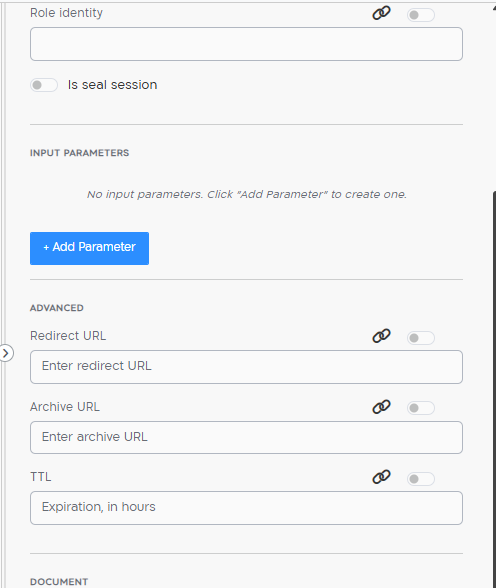
Section titled “Configure session time-to-live (TTL) on a BPMN session node”You can now set a TTL (Time To Live) directly on a session node in the BPMN editor. The value is entered in hours under the node’s Advanced settings (alongside Redirect URL and Archive URL), in the TTL — Expiration, in hours field.
When a TTL is set on the session node it overrides the default TTL defined in the template, so you can give individual session nodes a different expiration from the template default.
Search and filter records in a Dictionary
Section titled “Search and filter records in a Dictionary”The Dictionaries screen (Data Sources) now includes a search box that filters the dictionary’s records by your search criteria. Enter a term and click Search to narrow the table to matching rows, or Clear to return to the full list.
While a filter is active you can still manage the dictionary — the following actions remain available on the filtered view:
- Adding a new row is permitted.
- Deleting a row is permitted.
- Reordering rows is permitted.

Full detail: Dictionaries.
Download the draft as a PDF from the preview screen
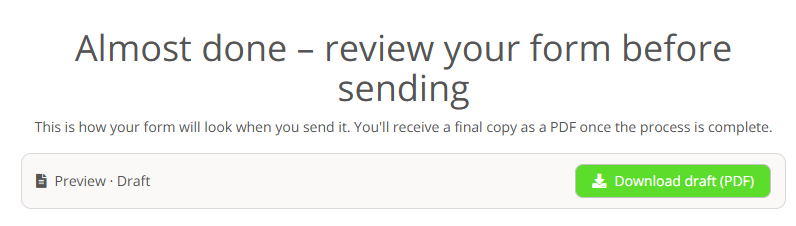
Section titled “Download the draft as a PDF from the preview screen”On the pre-send preview screen (“Almost done – review your form before sending”), clients can now download the draft as a PDF using a new Download draft (PDF) button. Previously the preview only displayed an image of the draft; the form can now be saved locally as a PDF file with a single click.
New SMS provider: Simasti
Section titled “New SMS provider: Simasti”Simasti is now available as an SMS integration provider, in addition to the existing providers. As with other SMS integrations, Simasti is configured per project.
Setting it up is a two-step process:
-
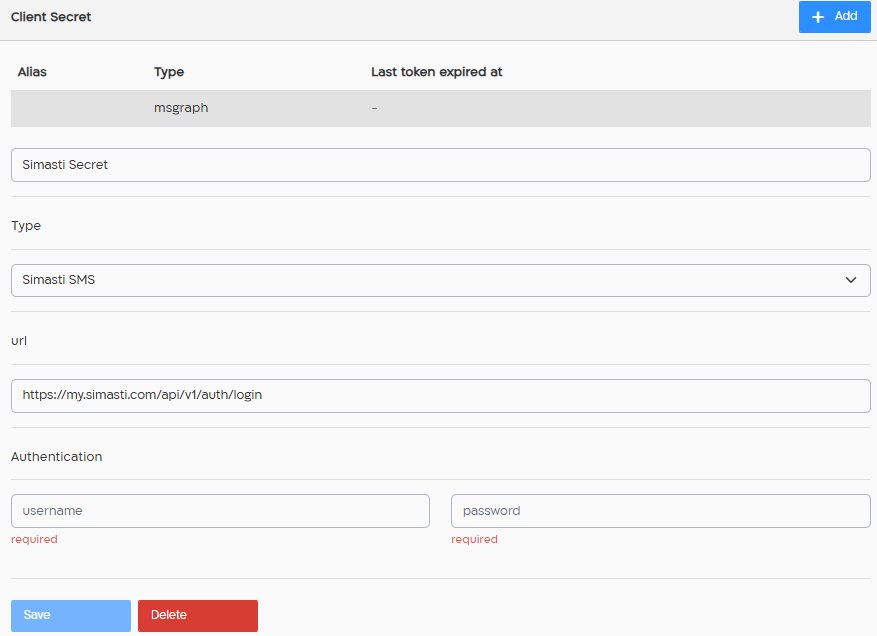
Create the credential — under Client Secrets, add a secret of type “Simasti SMS” (Simasti login URL plus username and password).
-
Add the SMS integration — add a new SMS integration, select the simasti.com provider, and choose the Simasti credential you created.
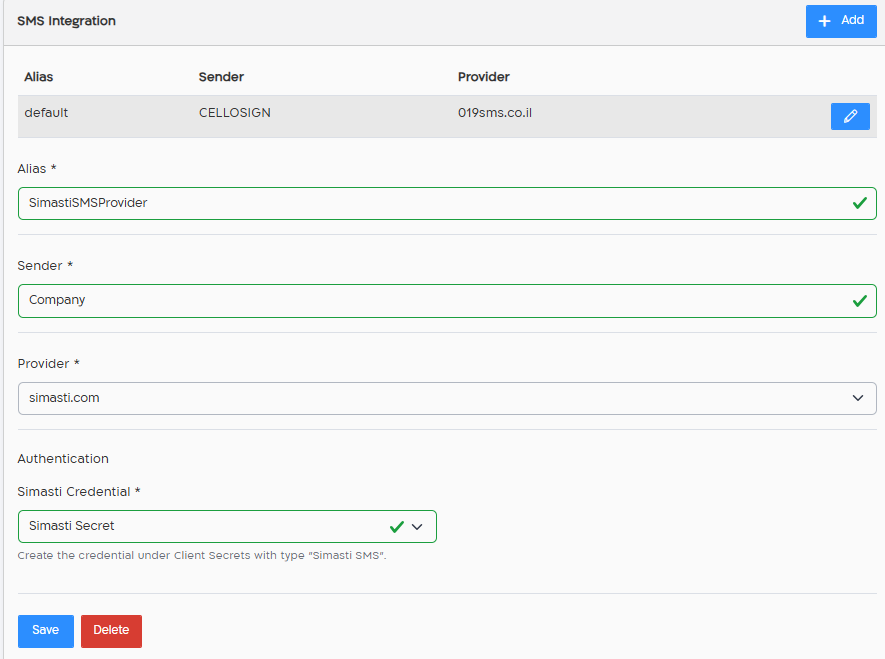
Step-by-step setup instructions: SMS integration.
Simasti API reference: https://api.simasti.com.
Security
Section titled “Security”Enforce organization SSO across local login and project APIs
Section titled “Enforce organization SSO across local login and project APIs”SSO policy hardening. This release tightens how forced project/company SAML (SSO) authentication is enforced. Previously, forced SSO was applied only on selected representative/form flows, which still allowed a valid local password to open a session and reach project-scoped internal APIs even when the project’s effective SAML integration had force_authentication=true. Forced SSO is now enforced server-side, consistently across local login and the project APIs, so an enforced-SSO project can no longer be entered with a local password.
Behavior
- When a project or company SSO integration has enforced SSO turned on, users can no longer sign in to that project with a local username/password — they must authenticate through the project’s forced SAML identity provider (IdP).
- When enforced SSO is off, local username/password sign-in continues to work exactly as before. Optional-SAML and non-SSO projects remain backward compatible.
- For users who belong to both SSO-enforced and non-SSO projects, local sign-in still works for the non-SSO projects. SSO-enforced projects appear in the project list /
meas locked with ansso_requiredindicator, and their data and action endpoints return403 sso_requireduntil the session was established through an accepted SAML IdP. - New users created only for an SSO-enforced organization do not receive a usable local password, and no auto-generated welcome/temporary-password email is sent; they are onboarded through SSO provisioning.
- Non-interactive service accounts / API tokens are preserved and continue to operate; service accounts do not gain an interactive local-password path.
This change shipped in 4.51 and was also back-ported to 4.50.1.
Action required
Section titled “Action required”If your organization uses local (username/password) accounts and you turn on enforced SSO for a project or company, those local accounts can no longer sign in to the affected (SSO-enforced) projects — the affected users must sign in through your configured SAML identity provider.
Before enabling enforced SSO:
- Make sure every user who needs access to the SSO-enforced projects can authenticate through your IdP.
- Remember that local accounts continue to work for any project that is not SSO-enforced, and approved non-interactive service accounts / API tokens are unaffected.
Dedicated domain for form-filling (LAN forms)
Section titled “Dedicated domain for form-filling (LAN forms)”Form-filling traffic (the representative, client, public and signed-document flows) has been moved onto a dedicated form domain, separated from the management application domain, with a separate DMZ domain for public forms. Isolating the form domain from the application domain strengthens tenant isolation and hardens the form-authentication and cookie model (host-scoped __Host- cookies and an explicit cross-domain authorization handshake for authenticated forms).
New LAN-forms domain per environment:
| Environment | New LAN-forms domain / path |
|---|---|
| Stage | stage-form.cellosign.com |
| Pre-Production | preprod-form.cellosign.com |
| Production | form.cellosign.com |
Action required
Section titled “Action required”If your organization restricts outbound access from its internal network (LAN), for example with a firewall, proxy, or host-based allow-list, please allow access to the new LAN-forms domain for your environment, as listed in the table above.
If the new domain is not allowed, users inside your network will not be able to open forms that require authentication.
Please make this change before the rollout reaches your tenants. Your Cellosign account team can confirm the exact domain for your environment.