
How to comply: stop sending sensitive information by email
תוכן זה אינו זמין עדיין בשפה שלך.
Why this matters
Section titled “Why this matters”Health-data and privacy regulations often prohibit sending sensitive personal or medical documents over email. This control lets you use the product for regulated workflows without emailing sensitive results to signers.
The exact regulation that applies depends on your regulated operation and where the signers are located. The frameworks this feature maps to are:
| Regulation | Region | Why it applies |
|---|---|---|
| HIPAA (Health Insurance Portability and Accountability Act) | US | Governs Protected Health Information (PHI). Unencrypted email of PHI is a common violation; the Security Rule requires transmission safeguards. |
| GDPR — Article 9 | EU / EEA | Health data is a “special category” requiring heightened protection; emailing it plainly can breach the integrity / confidentiality principle (Art. 5(1)(f)). |
| Israeli Privacy Protection Law (1981) + Data Security Regulations (2017) | Israel | Medical information is “highly sensitive” data with strict security duties. Ministry of Health circulars also restrict emailing medical records. |
How to comply?
Section titled “How to comply?”To make a template compliant, you need to stop both directions in which a signed document can leave the system by email — the copy sent to the client, and the copy posted to the agent. These are two separate settings, in two different places.
| Recipient | Setting | Where it lives |
|---|---|---|
| Client (signer) | Send result email to clients — set to OFF | Per template → Messages & Reminders → Client Messages |
| Agent (your staff) | Post signed document to agent — uncheck | Per project → Messages |
Step A — Turn off the client result email (template setting)
Section titled “Step A — Turn off the client result email (template setting)”- Open the template you want to make compliant.
- Go to Messages & Reminders → Client Messages.
- Find “Send result email to clients” and switch it to OFF.
- A warning message appears confirming that client copy emails will no longer be posted. Save the template.
Path: Template › Messages & Reminders › Client Messages › Send result email to clients (OFF)
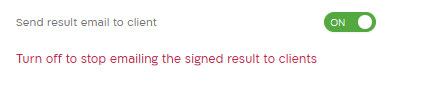
Result: Every session created from this template stops emailing the result document to clients — including copies sent through API integrations and batch runs. The change applies only to this template, so your other templates are unaffected.
Step B — Turn off the agent email (project setting)
Section titled “Step B — Turn off the agent email (project setting)”Switching off the client email does not stop the copy that is posted to the agent. That is controlled at the project level.
- Open the project settings.
- Go to the Messages section.
- Uncheck “Post signed document to agent”.
- Activate “Send failure report via storage integration” option
- Save.
Important — agent email has a known limitation: Unchecking Post signed document to agent stops the result email sent to the session author. It does not automatically stop copies sent to additional agent addresses configured elsewhere (for example a project agent email list, or template recipients). To be fully compliant, also remove any such addresses so no agent-side copy is emailed.
What is NOT suppressed?
Section titled “What is NOT suppressed?”This control targets the result / signed-document copy only. It does not disable invitation emails, SMS or other delivery channels, or workflow steps explicitly built to email a client. Review those separately if your compliance rules require it.