
Text area
תוכן זה אינו זמין עדיין בשפה שלך.
This controller is available only in the HTML template.
Types and Validation
Section titled “Types and Validation”
| Min length | The controller will verify the minimum length in the field integrity check. |
| Max length | The controller will verify the maximum length in the field integrity check. |
| Error Message Invalid | If an invalid value is entered, the form will notify the client by default according to the control type, for example “Data is invalid”. Insert an error message that will be displayed instead of the default. |
| Error if no value entered | If no value was entered to the field, the form will notify the client by default according to the type of controller, for example “Missing signature”. Insert an error message that will be displayed instead of the default. |
Conditional permissions
Section titled “Conditional permissions”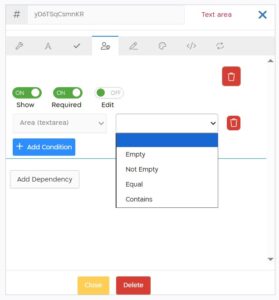
When checking conditions on a text area controller, the following options are displayed:
| Empty | If the text area controller has no value. |
| Not Empty | If there is any value in the controller. |
| Equal | If the text area controller is exactly equal to the entered value. |
| Contains | If the text controller contains the entered value. |