
Messages & Reminders
תוכן זה אינו זמין עדיין בשפה שלך.
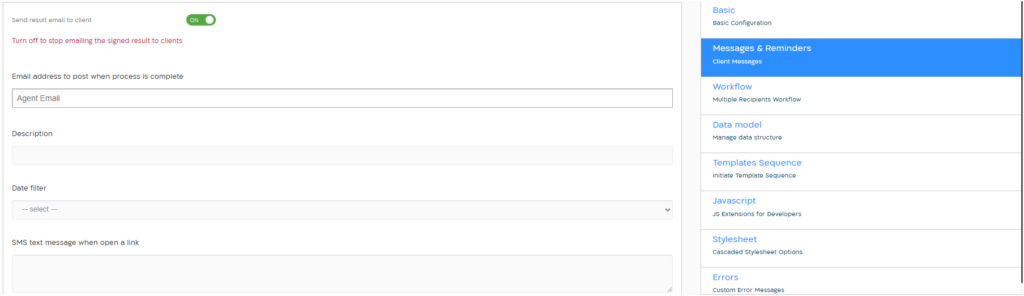
| Send result email to client | Send email with signed pdf to client at the end of session, given that invitation sent to email address. Setting is in ON by default. |
| Email address to post when process is complete | Add in this field permanent email addresses to which a copy will be sent at the end of the process. |
| Description | Description of the template in the dashboard screens. The text can contain dynamic data from the form. Click “@” to select an input field. |
| Date filter | Select a field from the form to display in the dashboard screens. |
| SMS text message when open a link | Text that will appear in the phone message to open the form. A link will be automatically added to the text. |
| SMS text when process is complete | A text message that will be sent to the client at the end of the process. Click @ to select an input field from the form. So the message to be sent can contain personal data such as: “Hello Israel, we received the form…”. |
| Select SMS destination | Select the destination of the SMS that will be sent at the end of the process, based on the data from the form. Default: Current destination |
| Invitation Email subject | Text that will appear in the email subject to open the form. |
| Invitation email body | Text that will appear in the body of the email to open the form. |
| Email subject for copy | Text that will appear in the email subject at the end of the process (copy to the client). The text can contain dynamic data from the form. Click “@” to select an input field. |
| Email body for copy | Text that will appear in the body of the email that will be sent as a copy to the client at the end of the process (signed copy). |
| Signed PDF file name | The name of a PDF file that will be sent as a signed copy at the end of the process. The name can contain dynamic data from the form. Click “@” to select an input field. A “#timestamp” tag can be added to the filename to make it unique. Default: signed.pdf |
| Remind about the expiration of the form | When set to ON the client will get a reminder about the expiration of the form. Default: OFF |
| Send with link | When set to ON the reminder will be sent with the form link. Default: ON |
| Remind before (minutes) | The time when the reminder will be sent, will be calculated from the Expiration time. Default: 15 |
| Destination | The destination of the reminder message. Default: Current |
| Reminder text | Text that will appear in the reminder message. |
| Export XLSX | When set to ON the XLSX file will be sent in addition to the JSON file in the signed copy email at the end of the process. Default: OFF |
| Export data to archive email | When set to ON the input data from the form will be exported to the archive email. Default: OFF |
| Title table | Title of the exported data table in the archive email. |
| Select fields to display | Select the fields to be exported to archive email. |
| Recipient target | Select the recipient of the exported data: agent, client or both. Default: Both |
| Show empty fields | When set to ON empty fields will be shown in the exported data table in the archive email. |