
תוכן זה אינו זמין עדיין בשפה שלך.
Email Validation
Section titled “Email Validation”Email validation will be performed according to the correct email format including “@” and “.”.
Only one email address is supported here. For example “israeli@cellosign.com”.

Validation limits
Section titled “Validation limits”Email validation is conformed to RFC 5322 which is basically composed of a string given that it includes “@” and a“.“ in specific places, there are no limitations on domains and sub-domain.
In case you require limitation on email addresses, consider using text field and combine with regex.
To do that:
- Add text control
- Use this regex ^[a-zA-Z0-9._%+-]+@[a-zA-Z0-9.-]+.(com|net)$ to validate an email structure that must include “.com” or “.net” extensions
- Customize the error message if needed
Note that by using a text field you will loose email functionality such as “client copy” as described below.
Values & Display
Section titled “Values & Display”While setting the “Client copy” to ON, a signed copy will be sent to the entered email address.

Types and Validation
Section titled “Types and Validation”

| Field’s equation | The controller will verify if the field value meets a condition against other field in the form and it can be case sensitive or not. In case the field with compare with has no value to comparison will not occur. If comparison is required that make sure the field to compare with is required. |
| Error Message Invalid | If an invalid value is entered, the form will notify the client by default according to the control type, for example “Data is invalid”. Insert an error message that will be displayed instead of the default. |
| Error if no value entered | If no value was entered to the field, the form will notify the client by default according to the type of controller, for example “Missing signature”. Insert an error message that will be displayed instead of the default. |
Conditional permissions
Section titled “Conditional permissions”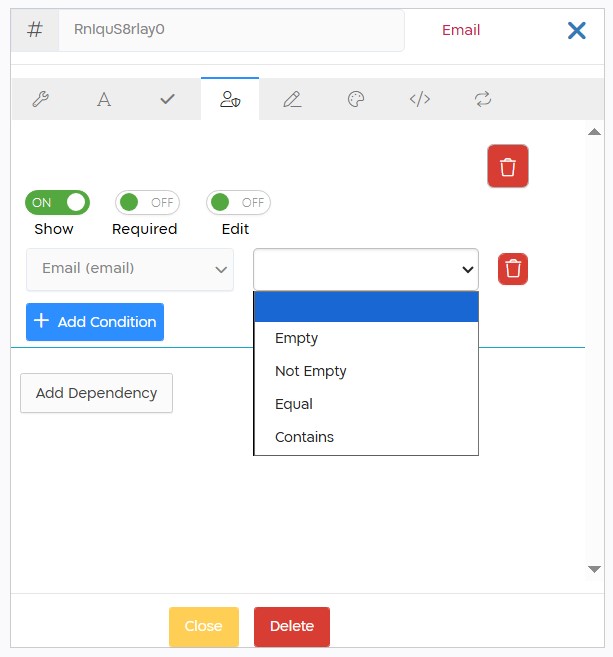
When checking conditions on the email type controller, the following options are displayed:
| Empty | If the email controller has no value. |
| Not Empty | If there is any value in the email controller. |
| Equal | If the email controller is exactly equal to the entered value. |
| Contains | If the email controller contains the entered value. |