
Country-Based Access Restrictions for clients
תוכן זה אינו זמין עדיין בשפה שלך.
With the Country-Based Access Restriction setting, you can now limit form availability to clients from specific countries. This helps ensure that your forms are only accessible in regions where you operate or have legal agreements in place, and it can also reduce unwanted traffic and fraud attempts from unsupported regions.
Key Benefits
Section titled “Key Benefits”- Enhanced Security: Minimize risk by preventing unauthorized or suspicious access from unsupported countries.
- Improved Compliance: Align form access with your organization’s data protection and regional policies.
- Streamlined User Experience: Focus engagement on relevant markets and reduce clutter from out-of-scope submissions.
How It Works?
Section titled “How It Works?”Admins can configure country-level restrictions directly from the form settings panel. Simply select the countries where you want the form to be accessible. Visitors outside of the allowed regions will be shown a customizable message letting them know the view isn’t available in their location. The restrictions is made to all end client views: forms and client forms portal
Login to console. Make sure you have the right project selected and click on “projects” icon at the sidebar.
Locate “Security” pane and scroll to “Country Codes whitelist”.
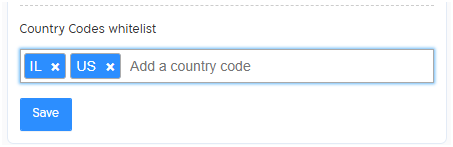
In this example access is restricted to Israel and the United states.
Enter two letters country code to allow access from. If the list is empty, be default access is not restricted.
For the full list of countries see this page. The code is on column “Alpha-2 code”.
This feature is now available to all enterprise and professional-tier users.
For more details on setup or to get started, please contact our support team or reach out to your account manager.