
Secured file upload settings
תוכן זה אינו זמין עדיין בשפה שלך.
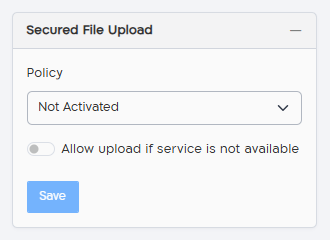
The Secured File Upload card turns on file cleansing for the project: every file and image that a client uploads in a form is checked for malware before it is saved.
The card is shown when file cleansing is included in your organization’s plan, to users with the Implementer, Project manager or Organization manager role.
| Setting | What it does |
|---|---|
| Policy | Not Activated (default): files aren’t checked. CLEANSING (recommended): each file is checked, and a cleaned copy is saved instead of the original. DETECTION: each file is checked, and saved as it is. With both policies, a file with malware is refused. |
| Allow upload if service is not available | What happens when the checking service doesn’t answer. On: the file is saved without a check. Off (default, recommended): the file is refused, as if it had malware. |
Click Save to keep your changes.
- The policy applies to forms created after you save. Forms that were already sent keep the policy they were created with.
- When a file is refused, the client sees “Error detected on uploaded file”. To change the message, see Errors.